
Taya365 Deposit Guide – Safe, Fast, and Hassle-Free Funding
Depositing at Taya365 is designed to be as smooth, secure, and convenient as possible. Whether you prefer digital wallets, online banking, or modern cryptocurrency payments, Taya365 offers a complete range of options that fit every player’s lifestyle. Our goal is to ensure that you can top up your wallet quickly and safely so you can enjoy uninterrupted gaming and betting across all Taya365 platforms.
With advanced payment processing technology, multi-layer encryption, and a user-friendly interface, Taya365 delivers a funding experience that stands out in the online gaming industry.
Why Depositing on Taya365 Is Different
Many gaming platforms offer basic top-up methods, but Taya365 enhances the process with advanced features designed to give players more speed, flexibility, and protection.
1. Multiple Fast and Reliable Payment Channels
Taya365 supports a wide range of deposit methods trusted across the Philippines, including GCash, Maya, Online Banking, and Cryptocurrency.
2. Instant Processing Times
Most deposits are credited within seconds, even during peak hours, allowing you to join games immediately.
3. Smart Payment Routing Technology
Our system automatically selects the fastest available payment channel to prevent delays or failed transactions.
4. Strict Security Protocols
Every payment goes through encrypted channels, fraud detection layers, and real-time verification.
5. Player-Friendly Deposit Limits
Whether you’re a casual gamer or a high-roller, Taya365 supports flexible deposit ranges suitable for all budgets.
Available Deposit Methods on Taya365
Taya365 supports the most popular and secure payment options widely used in the Philippines.
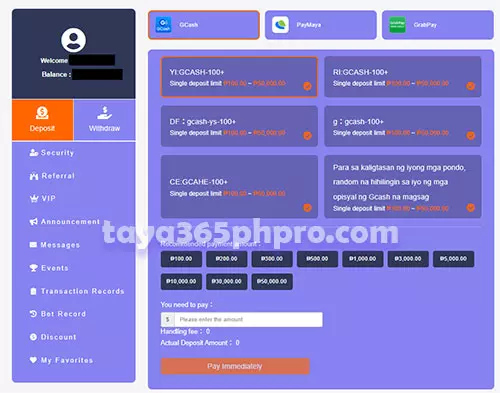
1. GCash
- Fast, seamless, and widely available.
- Ideal for mobile users who want instant deposits without complicated steps.
2. Maya
- Reliable and secure digital wallet with strong fraud protection.
- Perfect for both medium and high-value deposits.
3. Online Banking
- Supports major banks in the Philippines under Instapay or PESONet.
- Suitable for players who prefer traditional banking channels.
4. Cryptocurrency (Where Supported)
Taya365 accepts several major cryptos:
- USDT (TRC20)
- BTC
- ETH
- BNB
Offers fast processing and global accessibility with minimal fees.
5. Other Local Wallets (When Available)
Certain regions may support additional e-wallets depending on availability.
Deposit Limits
To maintain secure and efficient transactions, Taya365 implements player-friendly deposit limits:
- Minimum Deposit: PHP 100
- Maximum Deposit: PHP 50,000 per transaction
High-rollers may request customized limits by contacting VIP Support.
How to Make a Deposit – Complete Step-by-Step Guide
No matter which method you prefer, depositing at Taya365 follows a simple and intuitive process.
Step-by-Step Deposit Guide (GCash)
- Log in to your Taya365 account
- Go to the “Wallet” or “Cashier” section
- Select “Deposit”
- Choose GCash as your payment method
- Enter your desired amount (minimum PHP 100)
- Confirm and proceed
- You will be redirected to the GCash page
- Log in to your GCash account
- Approve the transaction
- Return to Taya365 and check your updated wallet balance
Processing time: Instant
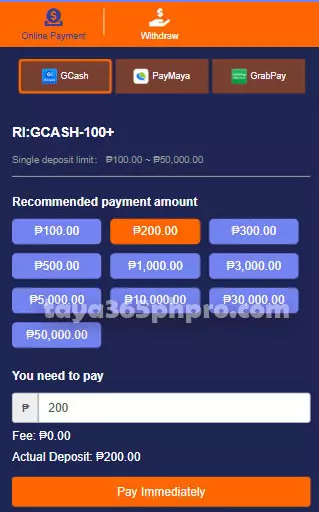
Step-by-Step Deposit Guide (Maya)
- Access the “Deposit” section on Taya365
- Select Maya
- Enter your deposit amount
- Follow the automatic redirect to your Maya account
- Confirm payment
- Balance updates immediately
Processing time: Instant
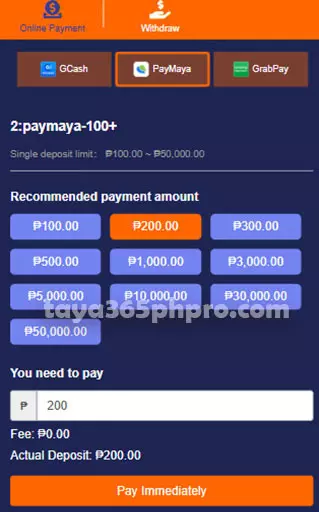
Step-by-Step Deposit Guide (Online Banking)
- Choose “Online Banking” from deposit options
- Select your bank from the list
- Enter deposit amount
- Log in through your bank portal
- Approve the transaction via OTP or App confirmation
- Balance will reflect after banking approval
Processing time:
- Instapay: Instant
- PESONet: Minutes to a few hours depending on bank load
Step-by-Step Deposit Guide (Cryptocurrency)
- Select “Crypto Deposit”
- Choose your preferred token (USDT, BTC, ETH, etc.)
- Copy your unique wallet address
- Send the exact amount to the provided address
- Wait for blockchain confirmation
- Taya365 automatically credits your balance
Processing time:
- TRC20: 1–3 minutes
- BTC/ETH: 10–30 minutes depending on network congestion
Unique Deposit Features Only on Taya365
Taya365 provides several advanced deposit enhancements not commonly found on other platforms.
1. Auto-Matching System for Faster Posting
The system automatically detects your payment details and matches them with the Taya365 wallet instantly.
2. Real-Time Deposit Tracker
Check your transaction status second-by-second inside your dashboard.
3. Mobile-Optimized Depositing
Deposit directly from mobile applications without switching screens.
4. Smart Retry Gateway
If one payment channel is overloaded, the system can automatically redirect to a faster available gateway.
5. Deposit Confirmation Notification
Receive SMS or in-app alerts the moment your funds are credited.
6. Deposit History & Financial Transparency
Your full deposit history is stored and viewable at any time.
Deposit Security and Fraud Protection
Taya365 uses enterprise-level security methods to protect your funds:
- End-to-end encryption
- Real-time fraud detection
- Account-device binding
- Behavior-based transaction monitoring
- Anti-phishing protocols
- Risk-level scoring for unusual deposits
Every payment request is processed through secure channels to eliminate unauthorized access.

Tips for Faster and Smoother Deposits
Players can enhance their deposit experience by following these recommendations:
1. Keep GCash and Maya apps updated
2. Maintain stable internet connection
3. Double-check transaction reference numbers
4. Avoid peak hours for bank transfers
5. Use TRC20 USDT for fastest cryptocurrency deposits
6. Make sure your wallet has enough balance for fees
Deposit Troubleshooting Guide
If you encounter any issues, here are the most common fixes:
1. Deposit Not Reflecting
- Check if the transaction is marked “Success”
- Refresh your Taya365 wallet
- Confirm your reference number
- Wait a few minutes during system peak time
2. Wrong Amount Entered
Contact support and provide:
- Screenshot
- Reference ID
- Transaction time
3. GCash/Maya Payment Failed
- Check if your wallet has enough balance
- Re-log the e-wallet
- Clear app cache or restart phone
4. Banking OTP Not Received
- Change network from WiFi to mobile data
- Request OTP again
- Check SMS inbox storage
5. Crypto Deposit Pending
- Wait for blockchain confirmation
- Confirm that the correct network was used (TRC20 vs ERC20)
Taya365 support team is always available to assist with any deposit issues.
Conclusion – Start Your Taya365 Experience with a Safe and Seamless Deposit
Depositing at Taya365 is fast, secure, and highly convenient. With a wide range of payment methods—GCash, Maya, Online Banking, Cryptocurrency, and more—players can choose the option that best suits their needs. Whether you’re a beginner or an experienced player, Taya365 ensures that your funding process is smooth, transparent, and protected with top-tier security measures.